
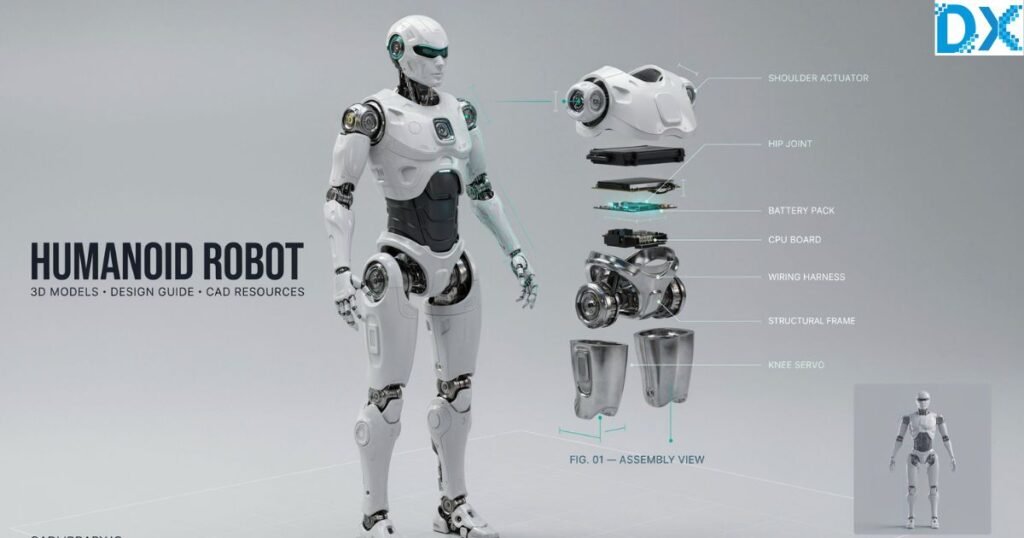
CAD Of Humanoid Robot
Humanoid robots are no longer limited to research laboratories or science fiction movies. Today, they are transforming industries ranging from healthcare and manufacturing to education and entertainment. Behind every successful humanoid robot lies a well-designed digital blueprint, making the cad of humanoid robot one of the most valuable resources for engineers, robotics students, product designers, and hobbyists alike.
Whether you’re searching for a Humanoid robot CAD model, looking for 3D models and free design guide CAD of humanoid robot download, or exploring Humanoid robot STL files for 3D printing, understanding how these digital models work can save countless hours during the design and prototyping process. This guide explains everything you need to know—from selecting the right CAD software and finding reliable model libraries to preparing your design for simulation, manufacturing, and rapid prototyping.
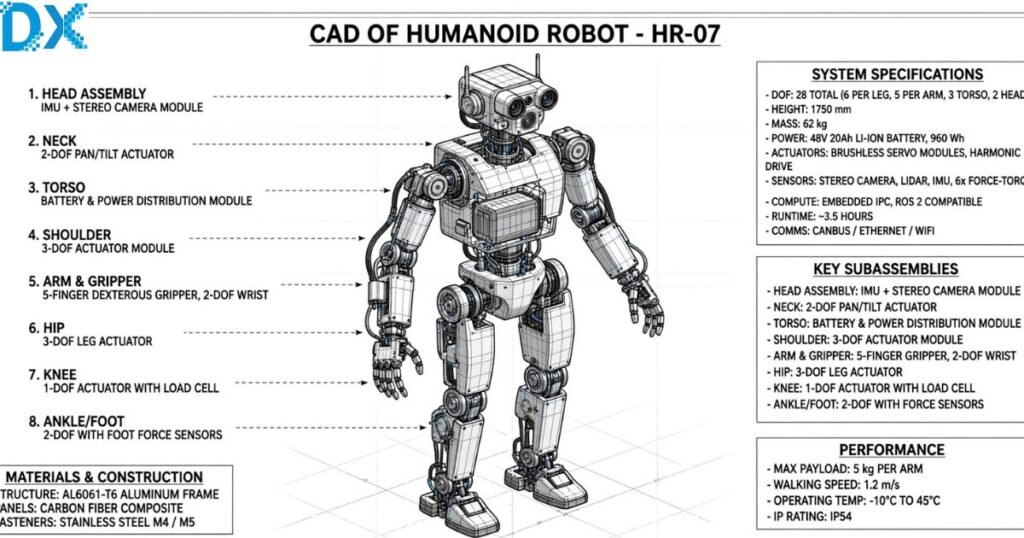
What Is a CAD of Humanoid Robot?
A CAD (Computer-Aided Design) model of a humanoid robot is a digital representation of a robot that resembles the human body’s structure and movement. These models enable engineers to visualize, modify, simulate, and manufacture robotic systems before building a physical prototype.
Unlike simple 3D illustrations, professional CAD models include engineering data such as:
- Precise dimensions
- Mechanical joints
- Motor mounting locations
- Gear assemblies
- Sensor placements
- Material specifications
- Motion constraints
Modern robotics companies rely heavily on CAD software because it reduces development costs and minimizes manufacturing errors.
Common File Formats
| File Type | Primary Use |
| STEP (.step/.stp) | Universal CAD exchange |
| IGES (.igs) | Engineering collaboration |
| STL (.stl) | 3D printing |
| OBJ (.obj) | Visualization |
| FBX (.fbx) | Animation |
| SLDPRT | SOLIDWORKS parts |
| F3D | Autodesk Fusion designs |
Industries Using Humanoid Robot CAD Models
Humanoid robot CAD files are widely used in:
- Industrial automation
- Medical robotics
- Academic research
- AI laboratories
- Educational institutions
- Defense research
- Consumer robotics
- Entertainment and animation
As robotics continues to evolve, high-quality CAD models have become an essential part of modern engineering workflows.
Why Engineers Use Humanoid Robot CAD Models
Designing a humanoid robot from scratch without digital planning is both expensive and time-consuming. CAD models allow engineers to validate designs virtually before investing in physical components.
Major Benefits
1. Faster Product Development
A complete CAD model enables teams to identify design flaws early, significantly reducing development cycles.
2. Accurate Mechanical Design
Every joint, actuator, and structural component can be measured precisely, ensuring compatibility during assembly.
3. Virtual Motion Simulation
Advanced CAD software integrates with simulation tools to analyze:
- Walking mechanics
- Joint rotation
- Torque requirements
- Balance control
- Center of gravity
- Collision detection
This helps prevent mechanical failures before manufacturing.
4. Easy Collaboration
Large robotics projects often involve mechanical engineers, electrical engineers, software developers, and AI specialists. CAD files serve as a common reference that keeps every team aligned.
5. Manufacturing Readiness
Once finalized, CAD models can be exported directly for:
- CNC machining
- Laser cutting
- Injection molding
- Metal fabrication
- 3D printing
This streamlines the transition from design to production.
Real-World Example
Imagine a startup developing a humanoid assistant robot for hospitals. Instead of building multiple expensive prototypes, engineers can:
- Design the entire robot digitally.
- Simulate walking and lifting motions.
- Optimize weight distribution.
- Test motor placement.
- Print only the necessary components.
This approach dramatically lowers development costs while improving design quality.
Best CAD Software for Designing Humanoid Robots
Choosing the right software depends on your experience level, project complexity, and intended application. Some tools are ideal for beginners, while others offer advanced simulation and engineering capabilities.
Comparison of Popular CAD Software
| Software | Best For | Free Version | Simulation | Difficulty |
| Autodesk Fusion 360 | Hobbyists & startups | Yes (personal use) | Yes | Medium |
| SOLIDWORKS | Professional engineering | No | Excellent | Advanced |
| Siemens NX | Enterprise robotics | No | Excellent | Advanced |
| CATIA | Aerospace & industrial robotics | No | Excellent | Advanced |
| FreeCAD | Open-source projects | Yes | Limited | Beginner |
| Onshape | Cloud collaboration | Yes (public projects) | Basic | Beginner |
Features to Look For
When selecting CAD software for humanoid robots, prioritize:
- Parametric modeling
- Assembly management
- Motion simulation
- Stress analysis
- Cloud collaboration
- Version control
- Robotics compatibility
- Export support for STEP and STL formats
These features make it easier to iterate on designs and collaborate with multidisciplinary teams.
Which Software Is Best?
For beginners:
- FreeCAD
- Fusion 360
- Onshape
For professional robotics engineers:
- SOLIDWORKS
- Siemens NX
- CATIA
The best choice depends on your budget, team size, and project goals.
Where to Find Humanoid Robot 3D Model Free Downloads
Finding reliable Humanoid Robot 3D model free download resources can significantly accelerate your design workflow. However, not all online models are suitable for engineering projects. Some are intended only for visualization, while others include complete mechanical assemblies ready for modification and manufacturing.
What Makes a Good CAD Model?
Before downloading a model, check whether it includes:
- Fully assembled components
- Editable CAD files
- Accurate dimensions
- Clearly named parts
- Joint mechanisms
- Compatible file formats (STEP, STL, IGES, SLDPRT)
- Licensing information for commercial or personal use
Avoid models that are incomplete, poorly organized, or lack engineering detail if your goal is prototyping or production.
Popular Sources for Free CAD Models
Several trusted platforms provide downloadable humanoid robot models and mechanical components:
| Platform | Best For | Common Formats |
| GrabCAD | Engineering-grade CAD models | STEP, SOLIDWORKS, IGES |
| Thingiverse | 3D printing projects | STL |
| Printables | Printable robot parts | STL |
| Autodesk Online Gallery | Fusion 360 projects | F3D, STEP |
| GitHub (Open-source robotics projects) | Robotics hardware designs | STEP, STL, CAD packages |
Expert Tip: Always verify the license before using downloaded files in commercial products. Some free models are available only for personal or educational use.
What to Check Before Downloading
Use this quick checklist:
- ✅ File opens correctly in your CAD software
- ✅ All components are included
- ✅ No missing assemblies
- ✅ Measurements are realistic
- ✅ Editable source files are available
- ✅ License allows your intended use
Choosing high-quality source files will save time when customizing or manufacturing your humanoid robot.
Key Components of a Humanoid Robot CAD Model
A professional cad of humanoid robot is much more than a collection of 3D parts. It represents an integrated mechanical system where every component must work together efficiently. Understanding these core elements helps engineers create robots that are functional, stable, and easier to manufacture.
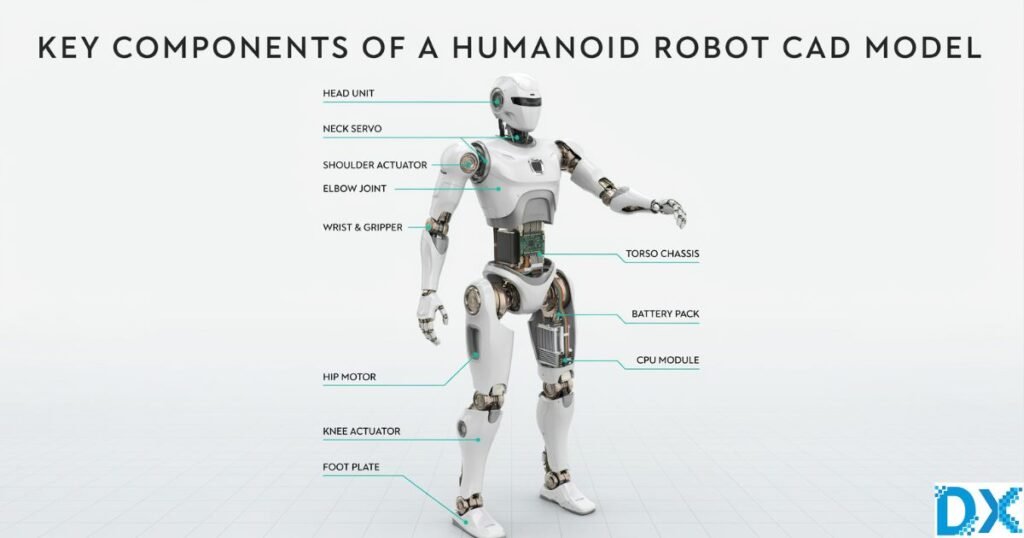
1. Head Assembly
The head often houses the robot’s sensing and communication systems. Typical components include:
- Cameras for computer vision
- LiDAR or depth sensors
- Microphones
- Speakers
- LED indicators
- Protective housing
A well-designed head balances functionality with weight, ensuring it doesn’t negatively affect the robot’s center of gravity.
2. Torso Structure
The torso acts as the robot’s central frame and typically contains:
- Main processor
- Battery pack
- Power distribution system
- Cooling components
- Internal wiring channels
The torso should provide sufficient space for upgrades while maintaining structural rigidity.
3. Arms and Hands
Humanoid robot arms mimic human movement through multiple degrees of freedom (DOF). A typical robotic arm includes:
- Shoulder joints
- Elbow joints
- Wrist rotation
- End effectors or robotic fingers
Designers often simulate arm movements to ensure smooth operation and avoid collisions between components.
4. Legs and Feet
Walking is one of the most complex tasks for humanoid robots. CAD models must account for:
- Hip joints
- Knee joints
- Ankle mechanisms
- Foot support
- Shock absorption
Proper leg design significantly impacts balance, mobility, and energy efficiency.
5. Actuators and Motors
Motors generate movement throughout the robot. Common options include:
- Servo motors
- Brushless DC motors
- Stepper motors
- Harmonic drive actuators
Each motor must be positioned accurately within the CAD assembly to avoid interference with surrounding parts.
6. Electronic Mounting Points
A practical CAD model includes mounting locations for:
- Control boards
- Sensors
- Communication modules
- Wiring harnesses
- Connectors
Planning these locations early prevents redesigns later in the development process.
Example Component Layout
| Component | Primary Function |
| Head | Vision and sensing |
| Torso | Structural support and electronics |
| Arms | Object manipulation |
| Hands | Precision gripping |
| Legs | Walking and balance |
| Feet | Ground stability |
| Battery | Power supply |
| Control Board | Robot processing |
Expert Tip: Design each major component as a separate assembly. Modular designs simplify maintenance, upgrades, and manufacturing.
How to Design Your Own Humanoid Robot Step by Step
Designing a humanoid robot may seem overwhelming, but following a structured workflow makes the process manageable. Whether you’re a student, hobbyist, or professional engineer, these steps will help you create a functional CAD model.
Step 1: Define the Robot’s Purpose
Before opening any CAD software, determine the robot’s intended application.
Examples include:
- Educational robotics
- Healthcare assistance
- Warehouse automation
- Research platform
- Home companion
- Entertainment robot
The robot’s purpose influences its size, mobility, payload, and sensor requirements.
Step 2: Create Initial Sketches
Begin with rough concept drawings that define:
- Height
- Body proportions
- Joint locations
- Limb lengths
- Internal component placement
These sketches provide a roadmap for the CAD modeling process.
Step 3: Build the Skeleton
Create the robot’s structural frame first.
Focus on:
- Spine
- Pelvis
- Shoulders
- Arms
- Legs
- Neck
Maintaining accurate proportions helps achieve realistic movement later.
Step 4: Add Mechanical Joints
Humanoid robots typically require multiple degrees of freedom.
Common joint locations include:
- Neck
- Shoulders
- Elbows
- Wrists
- Waist
- Hips
- Knees
- Ankles
Each joint should include sufficient clearance for unrestricted motion.
Step 5: Integrate Motors and Electronics
Once the mechanical structure is complete, allocate space for:
- Servo motors
- Gearboxes
- Motor drivers
- Batteries
- Control boards
- Sensors
- Wiring channels
Planning cable routing during the CAD stage reduces assembly complexity.
Step 6: Run Motion Simulations
Most professional CAD platforms support simulation tools that allow you to:
- Check walking motion
- Test arm reach
- Detect collisions
- Evaluate joint limits
- Analyze stress points
Simulation helps identify design flaws before manufacturing begins.
Step 7: Prepare for Manufacturing
Export your completed model into appropriate formats:
- STEP for manufacturing
- STL for 3D printing
- IGES for CAD compatibility
- OBJ for visualization
Perform a final design review before production.
Common Beginner Mistakes
Avoid these frequent design errors:
- Oversized motors
- Weak structural supports
- Poor weight distribution
- Ignoring wire management
- Insufficient joint clearance
- Designing without manufacturing constraints
Learning from these mistakes early can save both time and resources.
CAD Models vs STL Files: What’s the Difference?
Many beginners confuse CAD models with STL files. While both are essential in robotics, they serve different purposes.
| Feature | CAD Model | STL File |
| Editable | Yes | No |
| Contains dimensions | Yes | Limited |
| Assembly information | Yes | No |
| Parametric features | Yes | No |
| Best for engineering | Yes | No |
| Best for 3D printing | Limited | Yes |
CAD Models
CAD files retain complete design information, including:
- Sketches
- Dimensions
- Constraints
- Features
- Assemblies
- Material assignments
These files are ideal for editing and engineering modifications.
STL Files
STL files convert a model into a mesh of triangles suitable for additive manufacturing.
Advantages include:
- Universal compatibility
- Fast slicing
- Easy 3D printing
- Smaller file size
However, STL files cannot easily be modified like native CAD files.
Which Should You Choose?
Choose CAD models if you need to:
- Modify the design
- Perform simulations
- Manufacture parts
- Create engineering drawings
Choose STL files if you simply want to:
- 3D print existing parts
- Prototype quickly
- Test physical assemblies
Many designers maintain both file types throughout the product development lifecycle.
Best Practices for Building High-Quality Robot Designs
Creating a reliable humanoid robot requires careful planning and attention to detail. The following best practices can improve design quality and reduce costly revisions.
Design for Manufacturability
Avoid creating parts that are unnecessarily complex or difficult to fabricate.
Instead:
- Use standard fasteners
- Minimize unique components
- Design with available manufacturing processes in mind
- Reduce excessive part count
Keep Assemblies Modular
Divide the robot into manageable modules such as:
- Head
- Torso
- Arms
- Legs
- Electronics
- Battery system
Modular assemblies simplify maintenance and future upgrades.
Prioritize Weight Distribution
An uneven center of gravity can cause instability during movement.
To improve balance:
- Place heavy batteries near the torso
- Keep motors close to joints
- Reduce unnecessary material
- Use lightweight structural components where possible
Leave Room for Maintenance
Ensure technicians can easily access:
- Batteries
- Wiring
- Motors
- Sensors
- Control boards
Poor accessibility increases repair time and maintenance costs.
Document Every Revision
Maintain organized project files that include:
- Version numbers
- Design notes
- Material changes
- Simulation results
- Assembly instructions
Good documentation supports collaboration and future improvements.
Validate Before Production
Before manufacturing, verify:
- ✔ Assembly fits correctly
- ✔ Moving parts do not collide
- ✔ Fastener locations are accessible
- ✔ Electronics fit within the enclosure
- ✔ Weight distribution is acceptable
- ✔ Cable routing is complete
Conducting a thorough design review minimizes unexpected issues during assembly.
External Resources for Further Learning
To deepen your understanding of humanoid robot design and CAD engineering, consider exploring these trusted organizations and resources:
- IEEE Robotics and Automation Society – Research papers, robotics standards, and industry developments.
- NVIDIA Robotics – AI-powered robotics platforms, simulation tools, and Isaac ecosystem.
- MIT Computer Science and Artificial Intelligence Laboratory (CSAIL) – Advanced robotics research and publications.
These authoritative sources provide valuable insights into robotics engineering, artificial intelligence, and next-generation humanoid robot development.
FAQs
1. Humanoid Robot 3D model free download
You can find free humanoid robot 3D models on reputable platforms such as GrabCAD, Thingiverse, Printables, and Autodesk’s community galleries. Many of these models are available in STEP, STL, OBJ, and Fusion 360 formats. Before downloading, always check the licensing terms to confirm whether the model is intended for personal, educational, or commercial use.
2. Humanoid Robot CAD model
A Humanoid Robot CAD model is an editable digital engineering file used to design, simulate, and manufacture humanoid robots. Unlike simple 3D graphics, CAD models include precise dimensions, assemblies, joints, and mechanical constraints, making them suitable for engineering and product development.
3. 3D Models & Free Design Guide: CAD of Humanoid Robot Download
If you’re looking for a 3D models & free design guide CAD of humanoid robot download, choose sources that provide editable CAD files, engineering drawings, assembly instructions, and compatible formats such as STEP or IGES. A quality design guide should also explain robot kinematics, joint design, actuator selection, and manufacturing considerations.
4. Humanoid Robot STL Files
Humanoid Robot STL files are optimized for 3D printing rather than engineering modifications. They contain the robot’s surface geometry in a mesh format, allowing hobbyists and engineers to print individual components using FDM or resin 3D printers. If you need to edit the design, obtain the original CAD files whenever possible.
Conclusion
The growing demand for intelligent robotics has made access to a high-quality cad of humanoid robot more valuable than ever. Whether you’re an engineering student building your first prototype, a researcher developing advanced robotic systems, or a product designer exploring automation, a well-structured CAD model provides the foundation for successful robot development.
From understanding the essential components of a humanoid robot to selecting the right CAD software and distinguishing between editable CAD files and STL models, every stage of the design process plays a critical role in creating efficient, reliable, and manufacturable robots. Investing time in accurate digital modeling, simulation, and testing helps reduce costs, improve performance, and accelerate product development.
As robotics technology continues to evolve alongside artificial intelligence, machine learning, and advanced manufacturing, mastering cad of humanoid robot design skills will become increasingly valuable. By using trusted resources, following engineering best practices, and continuously refining your designs, you can create humanoid robots that are not only innovative but also practical and ready for real-world applications.
Whether your goal is research, education, rapid prototyping, or commercial development, the right CAD workflow will help transform your ideas into functional robotic systems. Keep learning, experiment with new tools, and leverage reliable engineering resources to stay ahead in the rapidly advancing world of robotics.